Tools for Managing Incidents in Jira: Four Approaches Compared

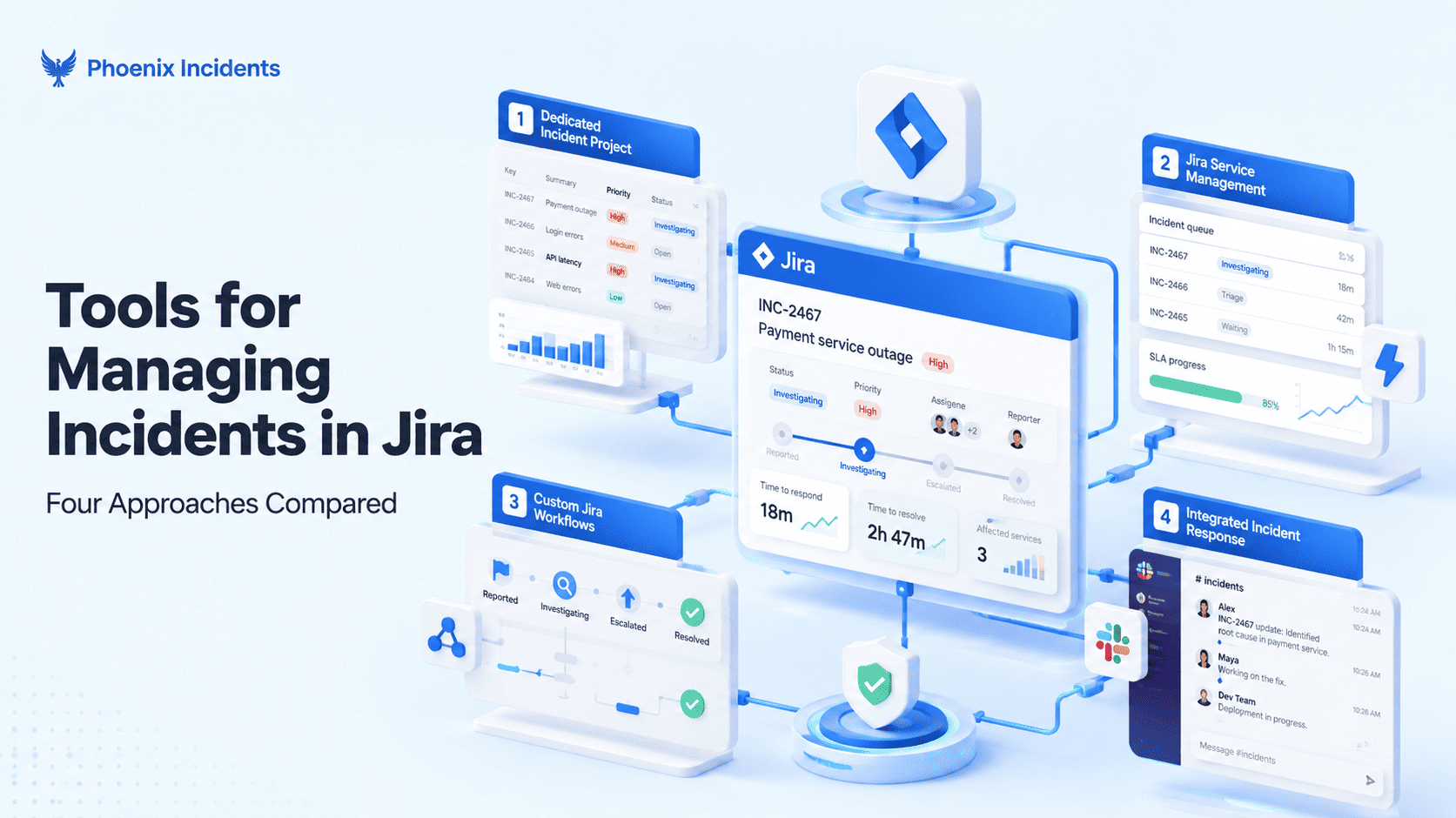
If you've searched for tools to manage incidents in Jira, you've probably noticed that the results don't agree on what you're asking.
That's because the question splits two ways, and most articles only answer one of them. Some teams want the incident itself to live in Jira, sitting alongside the bugs and stories their engineers already work on every day. Other teams are happy running the incident somewhere else entirely and just want the follow up work to land in Jira afterwards so nothing gets forgotten.
Those are very different setups, and nearly every list you'll find quietly assumes you're integrating with an outside platform and using Jira as the place the tickets land once it's over. That's a popular option and it works well for plenty of teams, but if you came here wanting incidents to run inside Jira, those lists won't answer your question.
So this guide answers it differently. Instead of just ranking tools, we're going to sort them by where the incident record lives, because that single decision shapes everything else: whether your responders switch tools at two in the morning, whether your incident history sits next to your delivery work, what you end up paying for, and how exposed you are when a vendor gets bought.
6 Questions to Ask Before Choosing an Incident Management Tool
Every vendor supports status updates, severity levels, and postmortems, so comparing features tells you very little. It's better to ask these six questions before looking at a single product page.
- Where does the incident record live?
Inside Jira, or on a vendor's platform with a copy pushed to Jira? The answer to this lays the foundation for the kind of tool your team needs.
- Where do responders coordinate?
Slack is where most engineering teams already talk during an outage. If your tool pulls them somewhere else while the site is down, most of them will quietly keep talking in Slack anyway and your incident record ends up missing half the story.
- Does the tool page people, or does it expect you to keep your existing pager?
Some products include on-call scheduling and escalation. Others deliberately leave paging alone and focus on what happens after someone picks up.
- How are you billed?
Some tools charge for every person who needs access, while others charge one price for the whole team. That difference matters because incidents pull in far more people than your on-call rotation covers, including engineers from other teams, support, and whoever is briefing the exec team. If each of those people needs a paid seat, the cost climbs quickly.
- What do you have to buy to unlock incident features?
Sometimes, incident specific capabilities are placed behind a higher tier, which means the starting price and the price you're paying to manage incidents are far apart.
- How stable is the vendor?
Two of the biggest names in this market changed hands or announced an end date in the last two years. That matters more than it used to.
If you want to go deeper before you shortlist anything, we've written about the five features that matter most when you're choosing an incident tool.
Sorting Tools by How They Run Incidents in Jira
These four approaches differ mainly in where the incident record lives. Compare each against the six questions above to work out which one fits your team.
Approach One: Build It With Jira Workflows and Automation
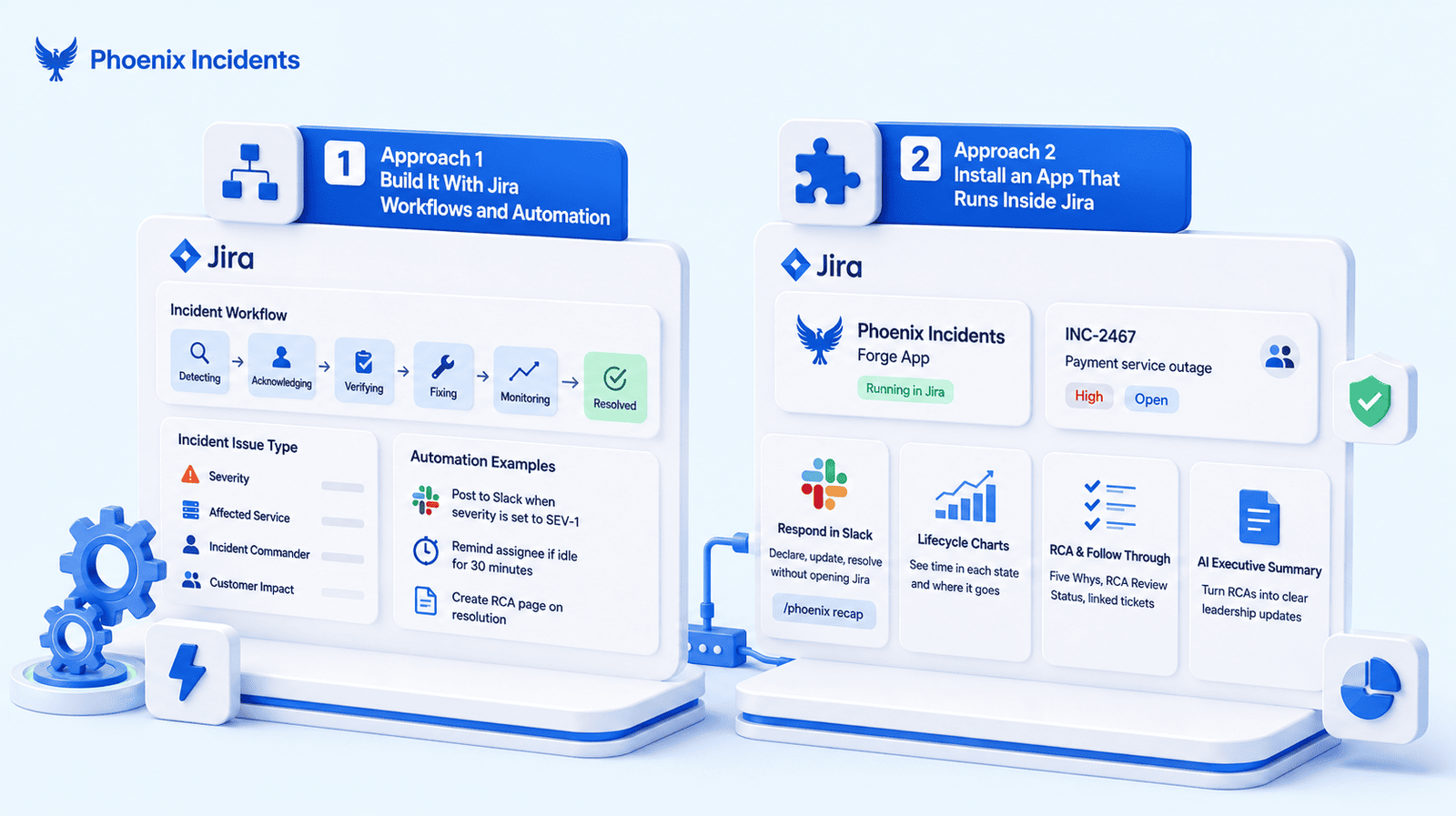
You can do a surprising amount of this yourself, for free, using what's already in Jira. Three pieces make up the setup:
- A dedicated incident issue type with the fields you care about, like severity, affected service, incident commander, and customer impact.
- A workflow that matches how your team really works, with states along the lines of Detecting, Acknowledging, Verifying, Fixing, Monitoring, and Resolved.
- Automation rules for the repetitive parts, so Jira posts to a Slack channel when severity is set to SEV-1, reminds the assignee if an incident sits untouched for thirty minutes, and creates a Confluence page from an RCA template the moment an incident moves to Resolved.
Teams build this, and it works. You get incidents living right next to your delivery work, you're paying nothing extra, and you learn a lot about what your process needs.
The problems, however, show up sooner than you'd expect, and they usually land in four places:
- Automation rules pile up over time, start triggering each other in ways you never intended, and eventually nobody remembers what half of them were built for.
- Reporting turns out to be the hard part. Measuring how long incidents spend in each state means wrestling with Jira's built in reports or exporting everything to a spreadsheet once a month.
- Data quality drops when people skip workflow stages during a real incident, which is exactly when the data matters most.
- Whoever built it becomes the only person who can fix it, and that person won't always be available.
If you're a small team running a handful of incidents a quarter, this is a perfectly sensible place to be. But if your incident volume is climbing and someone's weekends are getting eaten by maintenance, that's the signal to look at the other three approaches below.
Approach Two: Install an App That Runs Inside Jira
Fewer apps run incidents inside Jira than you'd expect, so this is a short field.
Search the Marketplace for incident management and you'll get hundreds of results, but almost all of them fall into two categories:
- ITSM add ons that extend Jira Service Management with things like approval chains and portal customization.
- Connectors published by external incident platforms. These are useful, but the app is a bridge rather than the product, and the incident still runs on the vendor's system.
Apps that run the whole incident lifecycle inside Jira are rare. Phoenix Incidents is built this way, as a Forge app. And measured against the six questions above, here's where it stands:
- The incident record lives in Jira. Incidents are created as Jira issues, and the record never leaves.
- Responders coordinate in Slack, where they can declare, update, and resolve without opening Jira at all, and a /phoenix recap command summarizes the incident for anyone who joins late.
- Reporting is built in rather than exported. Lifecycle Charts show you how long incidents sit in each state and where the time goes.
- Follow through is guided after resolution. A Five Whys RCA turns findings into linked Jira tickets, RCA Review Status keeps a report under review without distorting your resolution metrics, and an AI Executive Summary turns a finished RCA into something you can send a leadership team.
There's one thing to understand before you shortlist it. Phoenix doesn't page anyone. There's currently no on-call schedule and no escalation policy, because native paging, Phoenix Alerts, is still on the waitlist rather than shipped. The design assumption is that you keep the pager you already have, and Phoenix handles the response itself, from declaring the incident through to the RCA. Decide with your team whether that split works for you.
Approach Three: Connect an External Platform
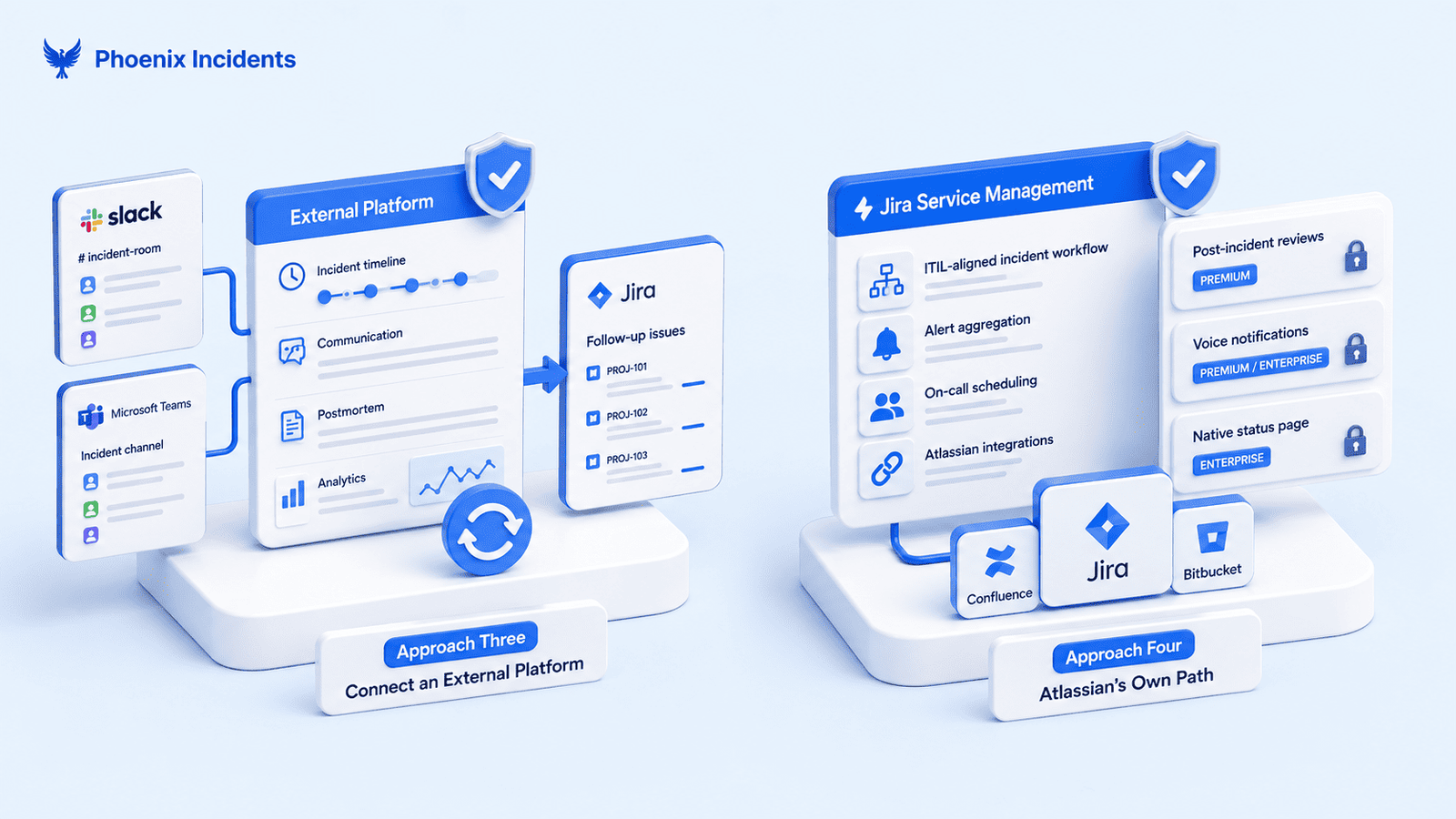
This is the most common setup by far, and it's where teams usually land when they say they run incidents with Jira.
The model is consistent across vendors. The incident runs in Slack or Microsoft Teams on the vendor's platform, the timeline and postmortem live there too, and Jira receives issues for the follow up work. Your engineers get a polished incident experience, and your delivery workflow gets tickets it can prioritize. The downside is that your incident history and your delivery history live in two systems, and reconciling them later is your problem.
The main options break down like this:
- Rootly runs the incident in Slack or Teams and offers the deepest Jira connection of the group, with two way sync that keeps status, assignee, and priority current between the incident record and the Jira issue. If you want action items tracked to completion in Jira without anyone copying and pasting, this is the strongest version of the connector model.
- incident.io is Slack native with strong postmortem automation. Its Jira app pushes follow ups into Jira issues with severity, owners, and timestamps attached, and reflects changes back when those issues get updated or resolved. Good fit if you want structured incident response with clean handoff into engineering.
- PagerDuty comes at this from alerting first. Its Jira connection sits inside a very large integration ecosystem, and it's the strongest option on the list for paging, escalation policies, and complicated on-call rotations across large teams. Incident coordination and postmortems are less of a focus.
- FireHydrant built its automation around a service catalog, so runbooks and ownership rules drive what happens during a response. It was acquired by Freshworks, and the plan is tighter integration with Freshservice over time, which is either good news or a reason to wait depending on your stack.
- Splunk On-Call is another alerting first option, and it's a common pairing for teams already invested in Splunk for observability.
The honest summary is that all of these integrate with Jira, and none of them run in Jira. If where the record lives doesn't matter much to you, these are well established products with good support, and this is probably where you should be looking.
Approach Four: Atlassian's Own Path
The main route is Jira Service Management. It gives you an ITIL aligned incident workflow, alert aggregation, on-call scheduling, and integration with the rest of the Atlassian stack. If your organization already runs JSM for IT service delivery, extending it to cover engineering incidents is a reasonable move, and it's the option with the least procurement work attached.
The complication is what sits behind which tier:
- Post incident reviews are gated to Premium, so generating and tracking PIRs isn't part of the base product.
- Voice notifications are Premium and Enterprise only.
- The native status page is Enterprise only.
None of these are unreasonable on their own, but they add up, and the real question is less about what JSM costs and more about what you're required to buy to unlock the incident features you came for.
There's also the Opsgenie situation, since its alerting and on-call capability is being folded into JSM and Compass as the product winds down. That matters if you're weighing JSM partly as a replacement. We've written a fuller breakdown of the Opsgenie alternatives for Jira teams if that's where you are right now.
What the 2026 Changes Mean for Jira Teams
Three market moves should change how you weigh these approaches.
- Opsgenie is ending. New sales closed in June 2025 and support runs out on 5 April 2027, which means thousands of teams are evaluating replacements right now rather than at their leisure.
- FireHydrant is now part of Freshworks, and the roadmap is being pointed at a combined service and operations platform built around Freshservice.
- Atlassian is testing an incidents feature inside Jira Cloud, currently in early access.
So if your incident record lives on a vendor's platform and that vendor gets acquired or shut down, your history sits inside the product that's changing. Migration then means exporting timelines, postmortems, and action items, and hoping the structure survives the trip. If your incident record lives in Jira, losing a vendor still means finding a new tool, but you don't have to move any data, because it was already sitting there.
None of this makes external platforms a bad choice. Plenty of teams look at the risk, decide the features are worth it, and are glad they did. The point is that vendor stability now deserves a place on your checklist, because it only becomes a problem when someone else decides you're migrating.
How to Choose
Rather than picking a winner, see which of these sounds like your team.
1. You run a handful of incidents a quarter and have a spare afternoon:
Build it yourself with Jira workflows and automation. You'll learn what your process needs, and you can revisit the decision when volume grows.
2. Your team lives in Jira and Slack, you already have a pager you're happy with, and the gap is everything after the page:
Look at apps that run inside Jira. Phoenix Incidents is built for exactly this setup, with the incident record staying in Jira, coordination happening in Slack, and your existing pager left to do the paging.
3. You want the most mature incident experience available and you're comfortable with the record living outside Jira:
Go with an external platform. Rootly and incident.io are the strongest for coordination and postmortems, PagerDuty for alerting across large teams.
4. Your organization already runs JSM and procurement is the hard part:
Extend what you have, but price out the tier you'll need rather than the tier you're on.
Once you've picked a direction, our guide to incident management software in Jira goes deeper on what a mature setup looks like in practice.
Frequently Asked Questions
1. Can you manage incidents in Jira without buying Jira Service Management?
Yes. Jira Software supports custom issue types, workflows, and automation rules, which is enough to run a basic incident process without JSM. Marketplace apps that run inside Jira also work on Jira Software. JSM becomes relevant when you need a customer facing service desk or ITIL aligned processes across IT rather than engineering.
2. Who should own incident management, engineering or IT?
It depends on what's breaking. IT service desks handle incidents that affect employees, like laptops, accounts, and access. Engineering teams handle incidents that affect the product your customers are using. Plenty of companies run both, with separate processes, because the response looks nothing alike. Trouble usually starts when one process is stretched to cover both.
3. Do you still need a paging tool if incidents run in Jira?
Usually, yes. Running incidents in Jira handles coordination, documentation, and follow through, but somebody still has to be woken up. Unless the tool you pick includes on-call scheduling and escalation, plan to keep a dedicated pager alongside it and check how the two stay in step.
4. What should you measure to know whether your incident process is working?
Start with how long it takes someone to acknowledge an incident and how long it takes to resolve one, since those show how quickly you react and recover. Then add the completion rate on post incident action items. That last one gets skipped most often, and it's the number that tells you whether you're fixing root causes or quietly repeating them.