Best Opsgenie Alternatives for Jira Teams.

If you're still running Opsgenie, you've probably already seen the migration banner in your admin console. Atlassian is retiring the standalone product, and every list of "Opsgenie alternatives" online is ready to tell you which paging tool should replace it.
What almost none of them mention is that Opsgenie was not only a paging tool.
- It routed alerts
- It ran on-call schedules
- And it gave teams a way to declare, track, and close out an incident.
Most of the alternatives on the market replace the first two jobs and quietly assume the third doesn't matter.
But for engineering teams running plain Jira Software and Slack, that third feature often matters more than anything else on the list.
This guide walks through what's actually happening with the Opsgenie shutdown, the two paths Atlassian wants you to take, a look at the third party alerting tools comparisons, and the option nobody's talking about: keeping Jira Software as your system of record and closing the incident workflow gap instead of adopting an entirely new platform.
What Opsgenie Did (And Why That Matters for Choosing a Replacement)
Opsgenie started as a straightforward alerting tool. Monitoring systems and integrations fired events into it, Opsgenie matched those events to the right on-call schedule, and it paged whoever was up through phone, SMS, push, or email until someone acknowledged.
Over time, Atlassian layered more onto that core: escalation policies, status pages, and a lightweight incident workflow for declaring, tracking, and closing out an incident once the page went out.
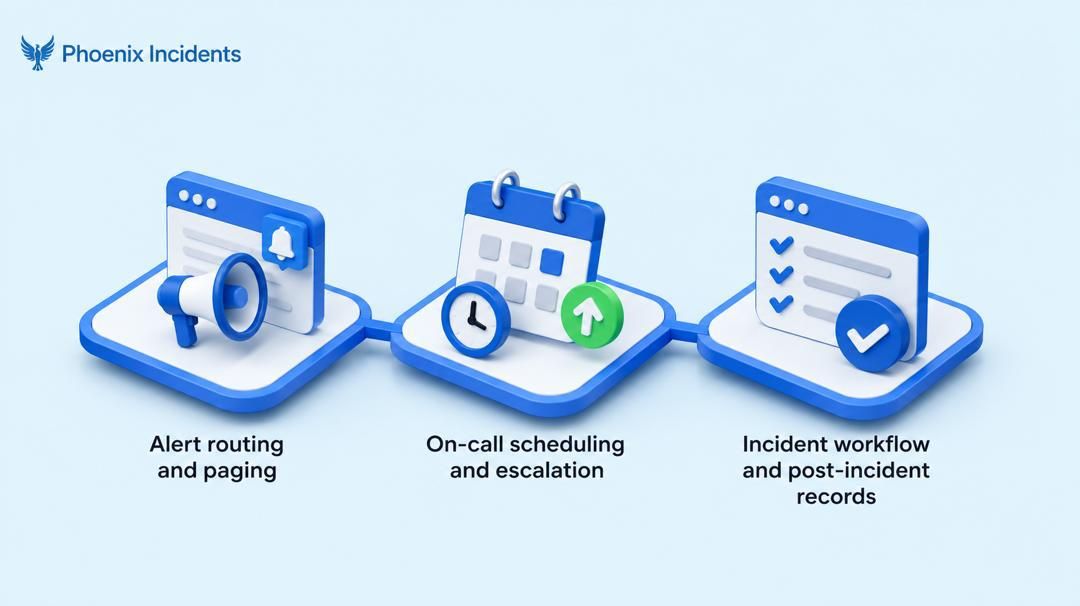
By the time it was retired, Opsgenie was really doing three separate jobs under one roof.
The Three Jobs Bundled Into One Tool
- Alert routing and paging: Deciding who gets notified when something breaks, and through which channel.
- On-call scheduling and escalation: Rotations, coverage visibility, and rules for escalating when the first responder doesn't acknowledge in time.
- Incident workflow: Declaring an incident, tracking it through resolution, and producing some kind of record afterward for a postmortem.
Why This Split Matters for Choosing a Replacement
Almost every Opsgenie alternatives list on the market evaluates tools against the first two jobs and quietly assumes the third doesn't matter.
That's a reasonable assumption if your team's pain was mostly about who gets paged. It's the wrong assumption if your pain was in what happens after the page goes out.
For teams running Jira Software and Slack, that third job is usually the one causing the most day-to-day pain: who's coordinating the Slack thread, who's updating the Jira ticket, and who's actually writing the postmortem once the incident is closed.
Keeping these three jobs separate makes it much easier to evaluate the rest of this guide, since every option below is strong at some of them and weak at others.
Path One: Staying in the Atlassian Ecosystem; JSM vs. Compass
Atlassian's own recommendation splits into two products, and the split itself is a source of confusion for a lot of teams who just had one tool before.
JSM vs. Compass
| Jira Service Management | Compass | |
|---|---|---|
| Built for | ITSM: incident, change, problem, and asset management | Engineering: alerting, on-call, software catalog |
| Overhead | Higher. A full service desk platform | Lower. Narrower in scope, closer to what Opsgenie actually did |
If your responders are all Jira users and you're comfortable adopting change management, service portals, and asset tracking alongside your incident workflow, JSM is the path of least resistance.
And if you just want alerting and on-call without inheriting an ITSM platform, Compass is the lighter option, though it comes with less maturity as a dedicated incident tool.
JSM vs. Compass Pricing
Pricing below is pulled directly from Atlassian's Service Collection pricing page and Compass's own pricing page.
| Tier | JSM (per agent/month, annual) | Compass (per user/month, annual) |
|---|---|---|
| Free | $0, capped at 3 agents | $0, 3 full users, unlimited basic (read only) users |
| Standard | $20 | $8 |
| Premium | $51.42 | $25 |
| Enterprise | Custom, annual only | Not offered, Compass tops out at Premium |
JSM Standard sits close to Opsgenie's own Standard pricing, but the advanced incident management, post-incident reviews, and AIOps capabilities that most teams actually relied on live at Premium, a considerable jump up.
Single sign-on isn't included below Enterprise either. It requires a separate Atlassian Guard subscription on both Standard and Premium.
The Migration Discount
Several teams evaluating JSM have reported Atlassian offering a steep migration discount for Opsgenie customers, something in the range of 58% off the first year and 40% off the second.
We haven't been able to confirm this as a formally published policy on Atlassian's own pricing pages, so treat it as something to ask your account rep about directly rather than a guaranteed rate.
What's worth planning around either way is, any introductory discount tends to expire, and the math that made JSM look attractive in year one can look very different once pricing reverts to list in year three.
Run the three year total before you officially migrate.
Path Two: Third Party Alerting Tools
If you're not interested in staying inside the Atlassian ecosystem, the market for standalone alerting and on-call tools is more competitive than it was when Opsgenie first built its following.
None of these tools are wrong choices. They're just solving a narrower problem than the one most teams actually have.
5 Third-party Alerting Tools Alternatives
| Tool | Best for | Starting price | On-call included? | Jira integration |
|---|---|---|---|---|
| PagerDuty | Enterprise scale alerting with the most established integration ecosystem | Around $21/user/month | Available on add on tiers | Deep, two way |
| Rootly | Teams wanting Slack native, full lifecycle automation | Around $20/user/month | Yes | Bidirectional |
| incident.io | Startups prioritizing speed and AI generated postmortems | Roughly $15 to $45/user/month | Frequently sold separately | Native |
| Spike | Teams that want workflows close to what Opsgenie already felt like | Around $7/user/month | Yes | Yes |
| Grafana Cloud IRM | Teams already standardized on Grafana Cloud for observability | Bundled with Grafana Cloud | Yes | Integration, not native |
PagerDuty has the deepest bench of integrations and the most battle tested reliability, but its AIOps and advanced add ons can push the effective price well past the sticker rate.
Rootly and incident.io both lean heavily into Slack native workflows and AI assisted postmortems, which is a real upgrade if your team already lives in Slack, though incident.io's headline price commonly excludes on-call, so confirm the fully loaded cost before comparing.
Spike is worth a look specifically if your team liked how Opsgenie felt and wants something familiar without the ITSM overhead.
Grafana Cloud IRM makes the most sense only if you're already paying for Grafana Cloud, since the value is in the bundle rather than the standalone product.
Whichever you land on, always confirm whether the quoted price includes on-call scheduling. Several vendors price it as a separate module, and that's where a comparison that looked cheap on paper stops being cheap.
Path Three: Keep Jira Software and Close the Incident Coordination Gap
Picking a new alerting tool answers one question: who gets paged. But it doesn't answer a separate question: how does the incident actually get run once someone's been paged.
Alerting Choice and Incident Coordination Are Different Problems
Once an alert fires and someone picks up the page, a different set of jobs kicks in.
- Someone needs to open a Slack channel and pull in the right people.
- Someone needs to keep the Jira ticket current as the incident evolves.
- Someone needs to track follow up actions so they don't quietly disappear after the fire's out
- And someone eventually needs to write the postmortem.
None of the tools in the comparison table above replace that work. They were built to get the right person notified, not to run the incident from declaration through resolution and review.
For a team on plain Jira Software and Slack, this is usually the part that actually costs time during an incident.
Where Phoenix Incidents Fits
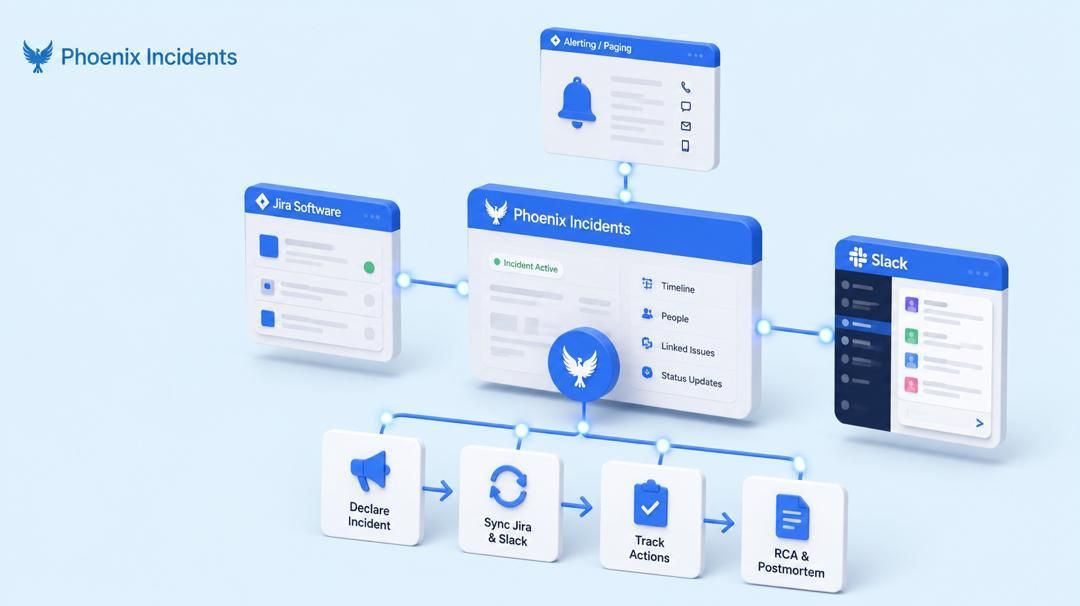
Phoenix Incidents coordinates incident response across Jira, Slack, and whichever paging tool you land on, whether that's JSM, Compass, PagerDuty, Rootly, or anything else on the table above.
It doesn't ask your team to learn a new platform or migrate your system of record.
Jira Software stays exactly where it is, and Phoenix runs the coordination layer on top:
- Declaring incidents.
- Syncing Jira and Slack in real time.
- And keeping RCA tracking attached to the incident instead of scattered across a doc nobody opens again.
That's the option most Opsgenie alternatives content skip entirely, because it assumes the answer has to be a full platform swap. It doesn't have to be.
See JSM vs. Phoenix Incidents. Link to [Internal link: JSM vs. Phoenix Incidents comparison post, add once slug is confirmed]
Which Path Fits Your Team?
- Wants to keep Jira Software as is and close the incident coordination gap without adopting a new platform: Any alerting tool, paired with Phoenix Incidents
- Fully standardized on Atlassian, responders are all Jira users: Jira Service Management
- Wants on-call coverage without ITSM overhead, values a software catalog: Compass
- Wants the most mature, battle tested alerting platform: PagerDuty
- Lives in Slack, wants fast setup: incident.io or Rootly
Ready to Close the Coordination Gap?
Opsgenie's shutdown doesn't have to mean a full platform migration.
If your team wants to keep Jira Software as its system of record and just fix what happens after the page goes out, Phoenix Incidents installs in minutes from the Atlassian Marketplace and works with whichever alerting tool you choose.
Install Phoenix Incidents or book a demo to see it with your own Jira setup.
Frequently Asked Questions
1. Does Opsgenie's shutdown mean I have to move to Jira Service Management?
No. JSM is Atlassian's recommended path, but it's not the only one. Compass, any of the third party alerting tools covered above, or a paging tool paired with Phoenix Incidents are all valid ways to replace what Opsgenie did, depending on how much of your workflow you want tied to the Atlassian ITSM stack.
2. What's the difference between Compass and JSM for on-call?
JSM is a full ITSM platform, incident management is one piece alongside change management, problem management, and asset tracking. Compass is narrower and built for engineering teams that want alerting and on-call coverage plus a software catalog, without the broader service desk layer. Compass carries less overhead, but JSM is the more mature option if your team already operates in ITSM terms.
3. Do I need Jira Service Management to do incident management in Jira?
No. Teams running plain Jira Software and Slack can handle incident response without adopting JSM at all. That's exactly the gap Phoenix Incidents is built to close, coordinating the incident workflow directly on top of Jira Software rather than requiring a move to a full ITSM platform.
4. Can I keep my current paging tool after Opsgenie shuts down?
Yes, and that's precisely where Phoenix Incidents fits. It's tool agnostic when it comes to alerting, so whether you land on PagerDuty, Rootly, Spike, or JSM's own alerting, Phoenix runs the coordination and coordination layer on top without requiring you to standardize on one vendor's full incident stack.