How to Choose an Incident Management Tool in 2026: 5 Essential Features for Engineering Teams

There’s a story every engineer has heard, and honestly, probably lived through at least once. An alert fires. People scramble for context. Messaging channels explode. Someone inevitably asks, “Who’s owning this?” And somewhere in that chaos, the question of what tool to use becomes a problem on top of the actual problem.
The right incident management tool doesn’t just help you fix issues faster. It keeps you organized before an incident, coordinated during it, and genuinely smarter after it. For teams already living in Jira and Slack, the right tool dramatically reduces chaos without forcing a new system on already-stretched engineers.
The stakes have never been higher. According to New Relic’s 2025 Observability Forecast Report, high-impact outages now cost organizations up to $2 million per hour. And the Incident Response Services market is projected to grow from $35.4 billion in 2024 to $157 billion by 2033 at 17.08% CAGR, a market signal that incident management is no longer optional infrastructure.
Here’s what to look for in 2026, the questions worth asking before you sign anything, and a framework for making a decision that holds up when things go wrong.
What Is an Incident Management Tool?
Before evaluating any platform, it helps to be precise about what these tools are supposed to do. According to Atlassian’s incident management documentation, an incident management tool helps teams “prepare for, respond to, and learn from incidents”, providing shared visibility and coordination throughout the process. The key phrase is throughout the process. Not just the moment of firefighting, but the before and after too.
A tool that only handles the firefighting moment isn’t a full solution, it’s a pager with extra steps. The most common mistake teams make when selecting incident management tools is optimizing for the acute crisis while underinvesting in the structural support that makes teams better over time: workflow enforcement, post-incident learning, and analytics that surface patterns across incidents.
Understanding the Incident Lifecycle
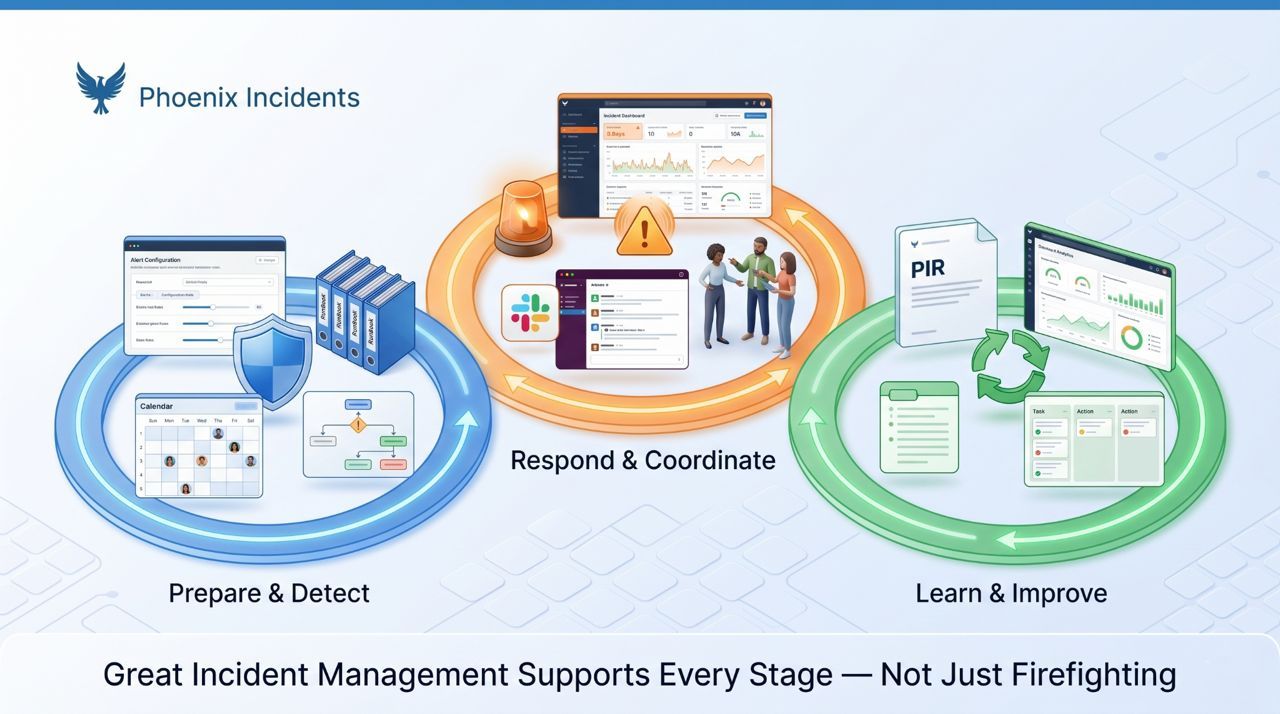
Any tool you seriously evaluate needs to support all three lifecycle stages. Teams that only focus on the ‘during’ phase tend to see the same incidents recur because the learning loop never closes.
Stage 1: Before the Incident
Early detection, smart routing, and frictionless ways to pull in the right people quickly. This is where preparation and defined escalation criteria pay off. The before stage includes on-call setup, alerting configuration, runbook documentation, and the psychological infrastructure that makes engineers comfortable escalating early. A tool that supports this stage makes declaration feel procedural rather than personal.
Stage 2: During the Incident
Pressure peaks here. Clear ownership, smooth communication, and a unified view of what’s happening prevent coordination breakdown. The ‘during’ stage is where most teams focus, and where most of the visible chaos happens. But the quality of the during-stage response is largely determined by the infrastructure built in the before stage.
Stage 3: After the Incident
This is where learning lives. When the dust settles, teams need a structured way to understand what happened, identify systemic improvements, and make sure the same failure doesn’t recur. As Google’s SRE Workbook notes, organizations that treat incidents as learning opportunities improve their reliability measurably over time. Without a structured after-stage, teams move fast and repeat the same failures.
A tool that only handles the firefighting moment isn’t a full solution, it’s a pager with extra steps.
5 Must-Have Incident Management Tool Features for Engineering Teams
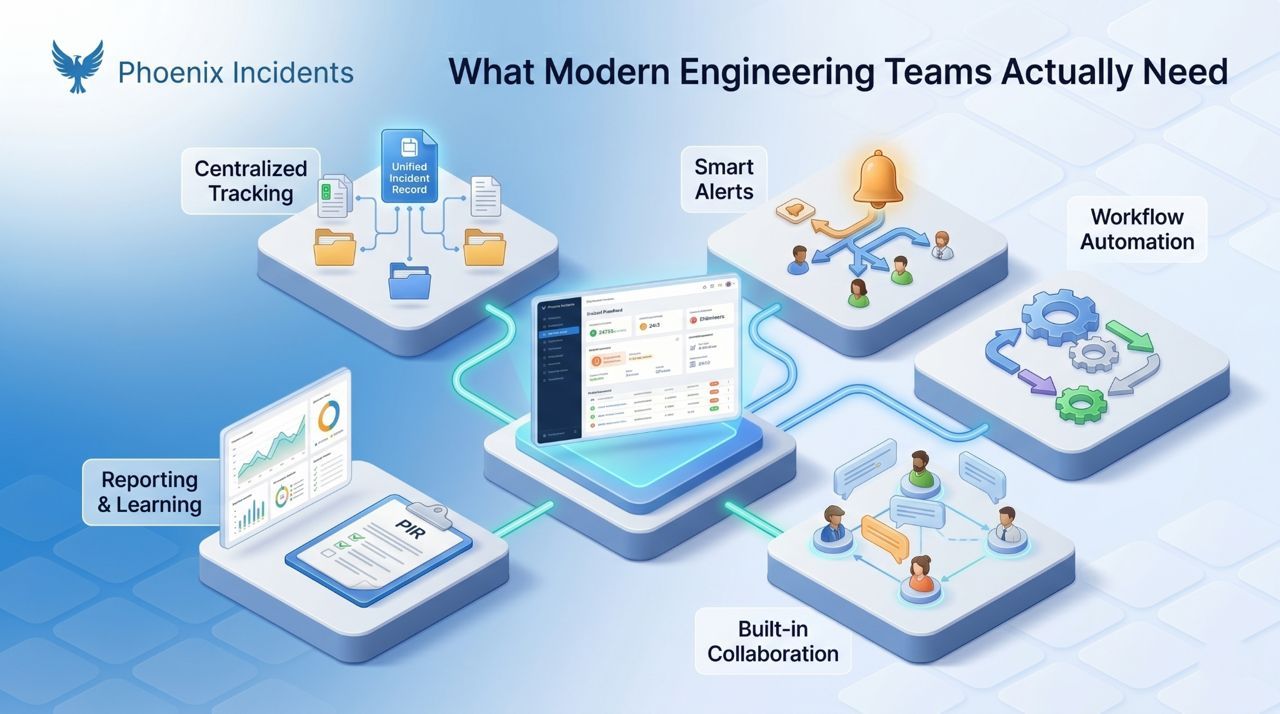
Based on these lifecycle demands and modern engineering expectations, here are the best incident management tool features teams should look out for:
1. Centralized Incident Tracking
Everything should live in one place: incident details, ownership, actions taken, updates, and timelines. A centralized system eliminates the fragmentation that kills coordination, Slack threads that contradict the Jira ticket, status updates that live in someone’s DMs, timeline gaps that make post-incident reviews useless.
Centralization isn’t just about convenience. It’s about trust. When responders aren’t sure which system has the current truth, they spend cognitive load on reconciliation instead of resolution. And when stakeholders can’t find authoritative status information, they interrupt responders to ask. Both problems disappear with genuine centralization.
Look for tools where:
- The incident record is the single source of truth, not one of several competing sources
- Slack and Jira (or your equivalent systems) stay automatically synchronized without manual updates
- Timeline reconstruction for PIRs happens from actual incident data, not from memory
- Search and filtering make it easy to find historical incidents and patterns
2. Real-Time Alerts & Smart Notifications
Speed matters, but noise reduction matters just as much. A tool that pages everyone for every alert creates fatigue that makes real escalations easy to miss. Alert fatigue is one of the most documented failure modes in SRE practice, teams that get too many alerts stop treating them seriously, and the one that matters gets lost in the noise.
Strong incident management tools in 2026 need to:
- Alert the right people instantly based on severity and service ownership
- Avoid alert fatigue with intelligent routing rules and deduplication
- Integrate with paging and chat systems teams already use (PagerDuty, OpsGenie, Slack)
- Support configurable escalation paths that match the team’s actual on-call structure
- Preserve human judgment in the escalation process, automated thresholds should prompt, not auto-declare
The distinction between automated alerting and human-initiated declaration matters here. Automated alerts catch patterns; human judgment decides when coordination is actually needed. Tools that support both, rather than forcing a choice, give teams the best of both approaches. See on-call best practices for more on structuring on-call to reduce fatigue.
3. Automation & Workflow Orchestration
Under pressure, manual steps slow teams down in ways that are hard to predict in advance. Automation reduces cognitive load by handling the repeatable parts of incident response, creation, escalation, reminders, task assignment, status updates, so engineers can focus on the actual problem.
But automation that removes human judgment entirely creates different problems. The goal isn’t to automate incident response; it’s to automate the process overhead so humans can focus on the work that requires judgment. Good workflow orchestration:
- Creates incident records, Slack channels, and Jira issues automatically from a single declaration action
- Triggers role assignment prompts at incident start
- Sends SLA-based reminders when incidents aren’t moving (e.g., “No update in 15 minutes for a SEV1”)
- Handles status update distribution without requiring responders to manage multiple channels
- Keeps people in control of key decisions while automating the surrounding logistics
The goal: the tool should help your team do the right thing automatically, even when no one is watching the process.
4. Collaboration Features Built Into the Workflow
Most incident delays come from broken communication, not broken systems. A good tool simplifies collaboration through dedicated incident channels, automatic status updates in shared spaces, clear visibility into who’s working on what, and synchronized timelines that don’t require manual updates.
The key word is built into the workflow. Collaboration features bolted on as separate interfaces create context-switching that slows teams down. When engineers have to switch between Slack, a dedicated incident tool, and Jira to get a complete picture, the overhead compounds during exactly the moments when speed matters most.
Research on context switching in incident response, see why context switching slows incident resolution, shows that moving between tools creates lag, missed updates, and coordination gaps that directly extend resolution time. The best tools in 2026 minimize the interfaces engineers need to manage, not multiply them.
5. Reporting, Analytics & Post-Incident Learning
Incidents are opportunities to improve, but only if the learning is captured and acted on. As Google’s SRE Workbook notes, organizations that treat incidents as learning opportunities rather than blame exercises improve their reliability measurably over time.
Strong tools offer:
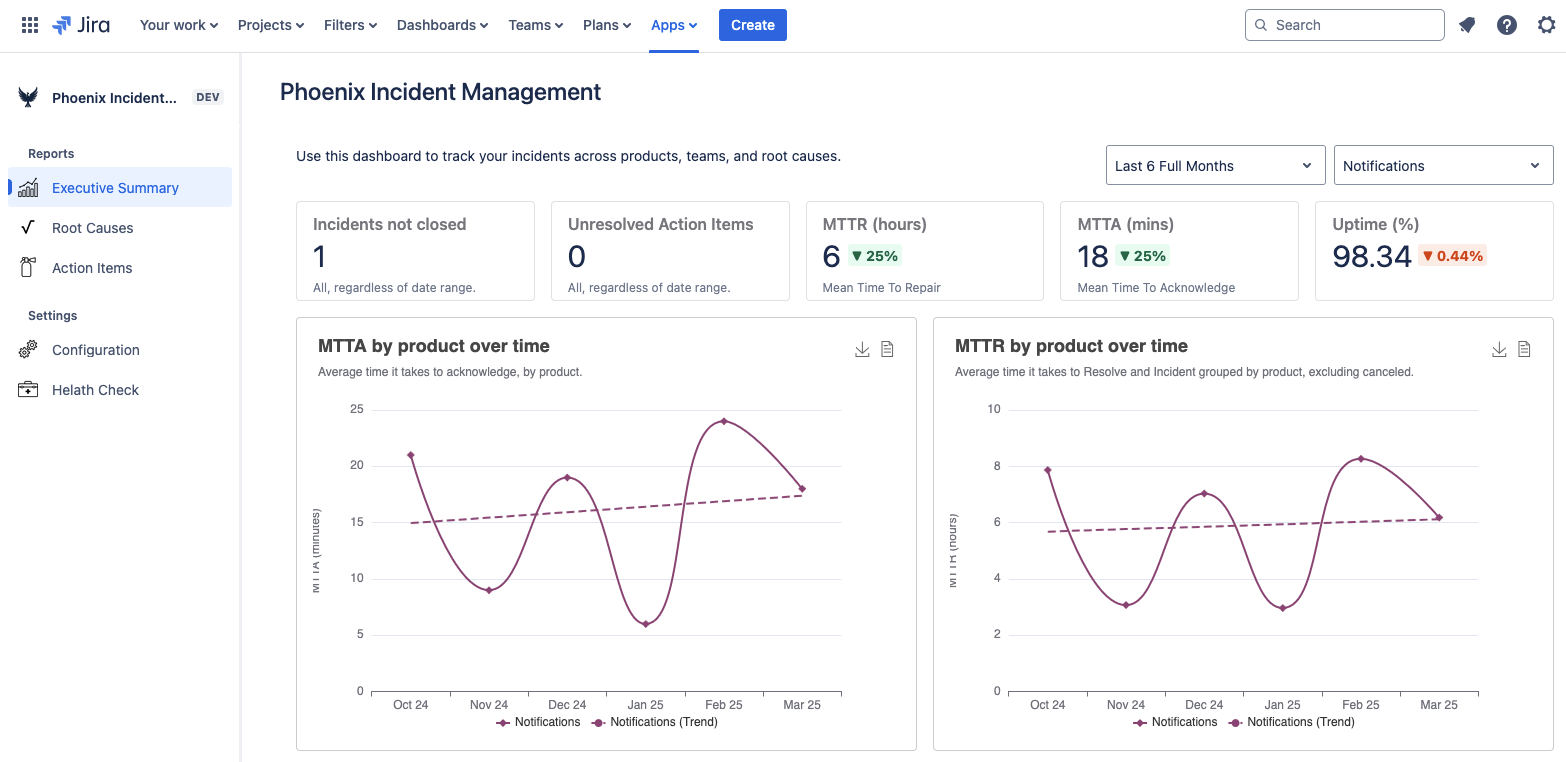
- MTTR (Mean Time to Recovery) and MTTA (Mean Time to Acknowledge) dashboards with trend analysis
- Incident volume and severity distribution over time
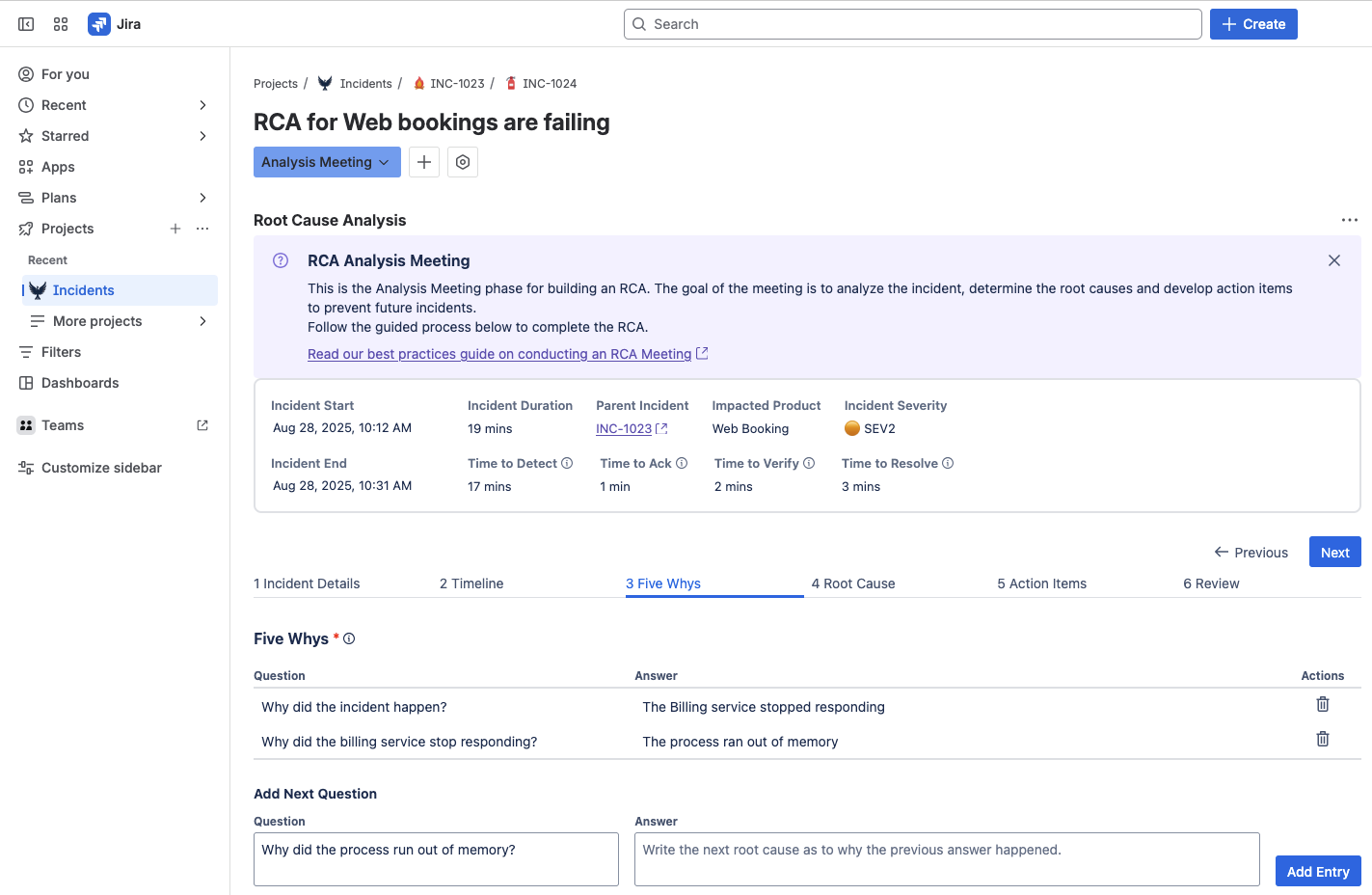
- Guided post-incident review workflows with 5 Whys root cause analysis
- Action item tracking that stays linked to the original incident and sends proactive reminders
- Recurring root cause analysis that surfaces patterns across multiple incidents
Without this infrastructure, learning from incidents is optional, which means it usually doesn’t happen. See the guide on incident KPI best practices for a detailed breakdown of which metrics to track and how to interpret them.
Mapping the Features to the Incident Lifecycle
Here’s how the five features map to each stage of the incident lifecycle and what gaps look like when a feature is missing:
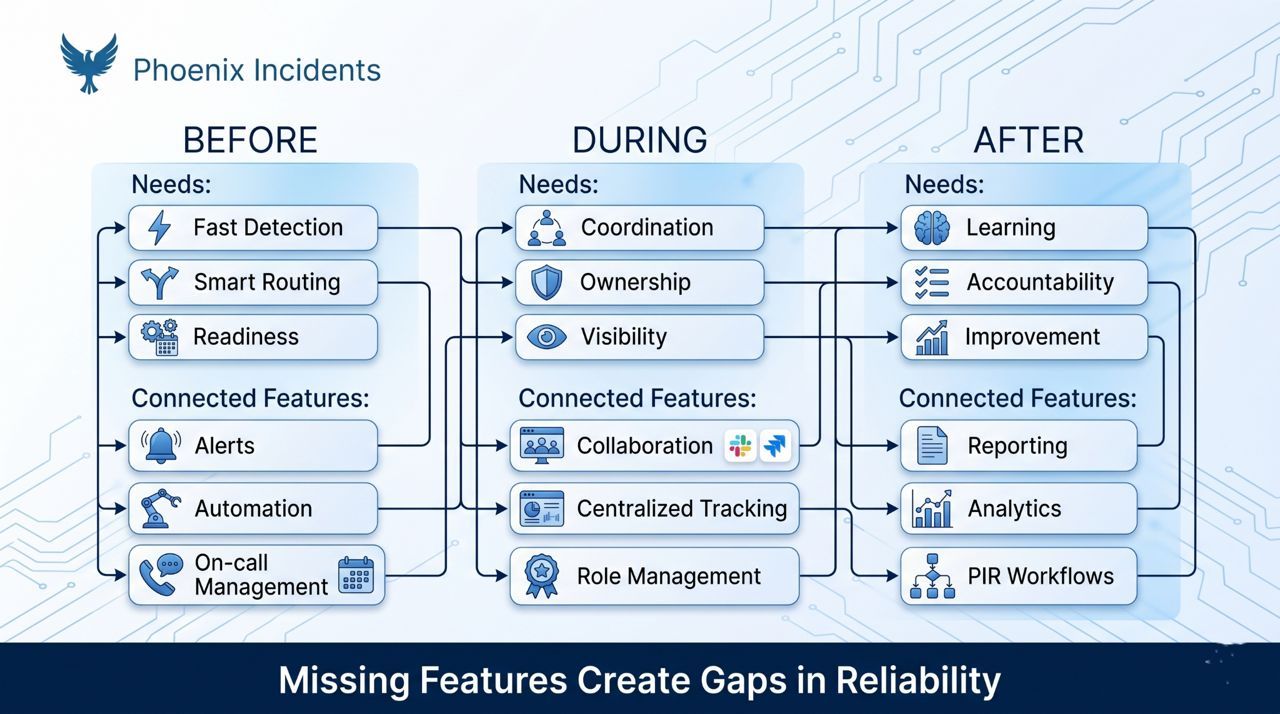
A complete tool covers all three stages seamlessly, not just the crisis moment.
Practical Checklist for Evaluating Tools
When reviewing tools, use this to stay focused and avoid getting distracted by surface-level features. Every item should have a concrete, demonstrable answer, not a “yes, we’re working on that”:
| Category | Evaluation Question | Why It Matters | Red Flags | |||
|---|---|---|---|---|---|---|
| Centralization | Can we track every incident in a single, accessible place? | Fragmented tracking creates coordination failures and unreliable post-incident data | Requires manual sync between systems; timeline is reconstructed manually | |||
| Integration | Does it work inside the tools our team already uses daily? | Context-switching during incidents extends resolution time | Requires engineers to log into a separate platform during an incident | |||
| Noise reduction | Will it reduce alert volume, not increase it? | Alert fatigue makes real escalations easy to miss | No deduplication; no severity-based routing; no configurable escalation paths | |||
| Automation | Are repetitive steps handled without manual intervention? | Manual overhead compounds during high-pressure moments | Engineers must manually create Jira tickets, Slack channels, and send updates | |||
| Human supervision | Can a human intervene and override at any stage? | Full automation removes judgment; incidents require human decisions | No way to override automated escalations or cancel a false alarm cleanly | |||
| Collaboration | Does it support clear, low-friction coordination during incidents? | Most incident delays come from communication breakdown, not technical failure | Collaboration happens in separate channels that don’t sync to the incident record | |||
| Post-incident | Does it guide meaningful reviews tied to tracked action items? | Without structure, learning is optional and usually skipped | PIR is a free-form notes field with no action item tracking or follow-up |
Build vs. Buy: A Framework for the Decision
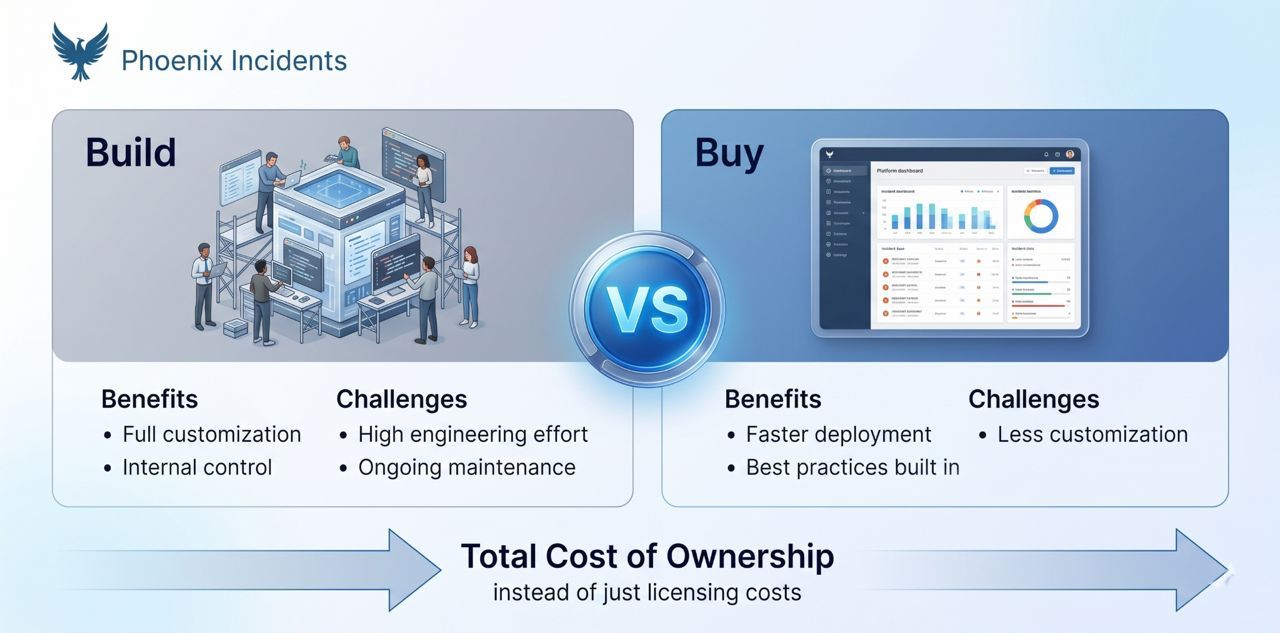
Some teams consider building custom incident management tooling instead of adopting a platform. Here’s an honest assessment:
For most engineering teams, the build case is weaker than it appears. The ongoing maintenance cost of a custom solution, especially as the team grows and the tool needs to evolve, typically exceeds the cost of a commercial platform within 12–18 months.
What People Think vs. What Actually Happens
What people think: “We just need a tool with more integrations.”
What actually happens: More integrations create more context-switching if the core workflow isn’t unified. The tools that actually reduce incident time in 2026 are the ones that feel invisible, they don’t add new interfaces to manage; they make the existing interfaces smarter.
What people think: “We need better alerting.”
What actually happens: Most teams aren’t slow to resolve incidents because alerts aren’t loud enough. They’re slow because coordination breaks down, unclear ownership, communication scattered across tools, no structured process. Better alerting is table stakes. What separates high-performing teams is what happens after the alert fires.
How Phoenix Incidents Delivers These Features
Some tools align especially well with these five features and the full incident lifecycle. For engineering teams that already live inside Jira, a Jira-native tool like Phoenix Incidents can feel intuitive without requiring massive behaviour change or a new tool learning curve.
Because it embeds incident tracking directly into Jira issues and integrates with Slack, paging systems, and MS Teams, Phoenix Incidents supports the before, during, and after flow without context-switching or manual system synchronization:
- Centralized tracking: lives inside Jira, where engineering work already lives, incidents aren’t siloed in a separate system
- Real-time coordination: happens in Slack, with Jira staying automatically in sync through the entire incident lifecycle
- Automation: reminders and workflow enforcement keep incidents moving without manual chasing from the incident lead
- Post-incident learning: structured PIRs with built-in 5 Whys and timeline reconstruction, see how to run a PIR for the full framework
- Analytics: MTTR, MTTA, action item completion rates, and recurring root causes, see incident KPI best practices for how to interpret these metrics
- It’s best for teams that handle production incidents inside Jira and Slack and want structured, consistent incident management without adopting a separate platform.
Frequently Asked Questions
1. What should I look for when choosing an incident management tool in 2026?
Prioritize five things: centralized tracking that keeps all systems synchronized, smart alerting that reduces noise rather than amplifying it, automation for the repeatable parts of incident response, collaboration features built into your existing workflow rather than bolted on, and post-incident learning capabilities with tracked action items. The best tools support the full incident lifecycle, before, during, and after, not just the crisis moment. Run them against the evaluation checklist above before making a decision.
2. Is a Jira-native incident management tool better than a standalone platform?
For teams already working in Jira, a native integration eliminates context-switching, reduces adoption friction, and keeps incident data alongside the rest of engineering work. Standalone platforms often require manual syncing between systems, which adds overhead exactly when teams can least afford it. The trade-off is customization: standalone platforms may offer more configuration options, but they come with the cost of maintaining another interface during incidents.
3. How do I reduce alert fatigue with an incident management tool?
Look for configurable escalation rules, severity-based routing, and intelligent deduplication. The goal is getting the right alert to the right person at the right time, not paging everyone for everything. Tools that support human-initiated incident declaration alongside automated alerting help teams preserve judgment about when an alert warrants full coordination. Also, systematically review and tune false alarm data rather than ignoring it. False alarms are calibration signals, not failures.
4. What’s the difference between MTTR and MTTA?
- MTTR (Mean Time to Recovery) measures how long it takes from incident detection to full service restoration. It's the end-to-end cost of an incident.
- MTTA (Mean Time to Acknowledge) measures how quickly the on-call team acknowledges an alert after it fires. It's a leading indicator.
- High MTTA often signals alert fatigue, unclear ownership, or poor on-call setup. High MTTR typically reflects workflow or coordination issues. Track both: MTTA tells you about the before stage; MTTR tells you about the during and after stages combined.
5. How important is post-incident review for engineering teams?
Very. Post-incident reviews are where the improvement loop closes. Without structured reviews, teams move on and repeat the same failures, often within weeks. The key is making reviews blameless, structured, and tied to actionable follow-up that actually gets completed. Tools that enforce PIR completion as part of incident resolution, and that track action items until they're done, turn post-incident review from an aspirational practice into a consistent one.
6. What’s the cost of choosing the wrong incident management tool?
Beyond the direct costs of slower recovery times, the wrong tool creates several compounding problems: adoption friction that causes engineers to work around it rather than with it, data fragmentation that makes post-incident learning impossible, and process inconsistency that means every incident is handled differently depending on who's on call. The right tool makes best practices the path of least resistance; the wrong one makes them optional.
7. Should we evaluate free tools or open-source alternatives?
Free and open-source tools can be appropriate for small teams with straightforward incident patterns. The trade-offs are usually maintenance overhead, limited post-incident analytics, and reduced automation. For teams handling frequent or complex incidents, the engineering time required to maintain and extend a free tool typically exceeds the cost of a commercial platform within 6–12 months. Evaluate based on total cost of ownership, not just licensing cost.