Slack Incident Management: How to Coordinate Production Incidents Without Leaving Slack

When something breaks in production, the incident is in Slack within seconds, because that’s already where your engineers live. Someone drops a message, a few people pile in, and the response starts before anyone has formally declared anything.
The problem then shows up thirty minutes later, when the channel has become the only record of what happened, nothing has made it into Jira, and people asking for a status update are scrolling through two hundred messages to reconstruct the timeline.
This is the tension every team running incidents in Slack eventually hits. Slack is where you respond in the moment, and Jira is where the record of what happened needs to live once the incident is over. The downtime behind these moments is expensive enough to take seriously. Splunk and Oxford Economics put the cost of unplanned downtime across the Global 2000 at around $600 billion a year, which works out to an average of $300 million per company, on top of a 3.4% drop in stock price after a single major incident.
The goal is to move quickly in Slack while still keeping a clean record and learning from each incident afterward, and this guide walks through how to do exactly that.
Why Teams Run Incidents in Slack in the First Place
Before complicating the picture, it is worth being clear that running incidents in Slack is a reasonable instinct, not a bad habit to be corrected. There are real advantages to coordinating where your team already works, and any honest case for adding structure has to start by acknowledging what Slack already gets right.
The reasons teams gravitate to Slack during an incident are consistent across almost every engineering organization:
- Responders are already there, so acknowledging an alert or pulling in a teammate takes no context switch into a separate tool.
- The channel becomes a real-time record everyone can see as it unfolds, which keeps the whole response in one shared view.
- Stakeholders can watch quietly without interrupting the people doing the work, stepping in only when they have something to add.
- Alerts can route straight into the channel from your monitoring and paging tools, so the signal arrives where the people are.
None of that is wrong. The trouble is that these advantages hold up until an incident gets large, long, or complicated enough that a chat channel alone stops being enough to manage it.
Where Unstructured Slack Incident Response Breaks Down
Slack is great at the live coordination part, but terrible at keeping anything you need after the conversation ends.
The ways this goes wrong are predictable, and most teams run into several of them in the same incident:
- Knowledge gets buried in scrollback: The decision about whether to roll back, the moment someone confirmed the database was the cause, the link to the dashboard that finally showed the problem, all of it is somewhere in the channel, and finding it later means scrolling.
- Every incident runs differently because nothing enforces a process: One engineer opens a channel and starts debugging, another spends ten minutes deciding what severity to assign, and a third forgets to tell anyone outside the channel that anything is happening.
- Nothing syncs to Jira on its own: The system of record goes stale the instant the conversation moves faster than the person who volunteered to keep the ticket updated.
- Action items evaporate when the channel goes quiet: The fix that everyone agreed was urgent at 2 a.m. has no owner and no due date once the immediate fire is out.
- There are no metrics afterward: Nothing about the incident was structured enough to measure, so you cannot tell whether your MTTA is improving or whether the same component has now caused four incidents this quarter.
That last point compounds the others. Learning from incidents depends on actually running post-incident reviews, and that discipline is weaker than most teams admit. When the record of what happened lives only in a Slack channel that will eventually be archived, the review either does not happen or happens from memory, and the same problems keep coming back.
What Good Slack Incident Management Actually Requires
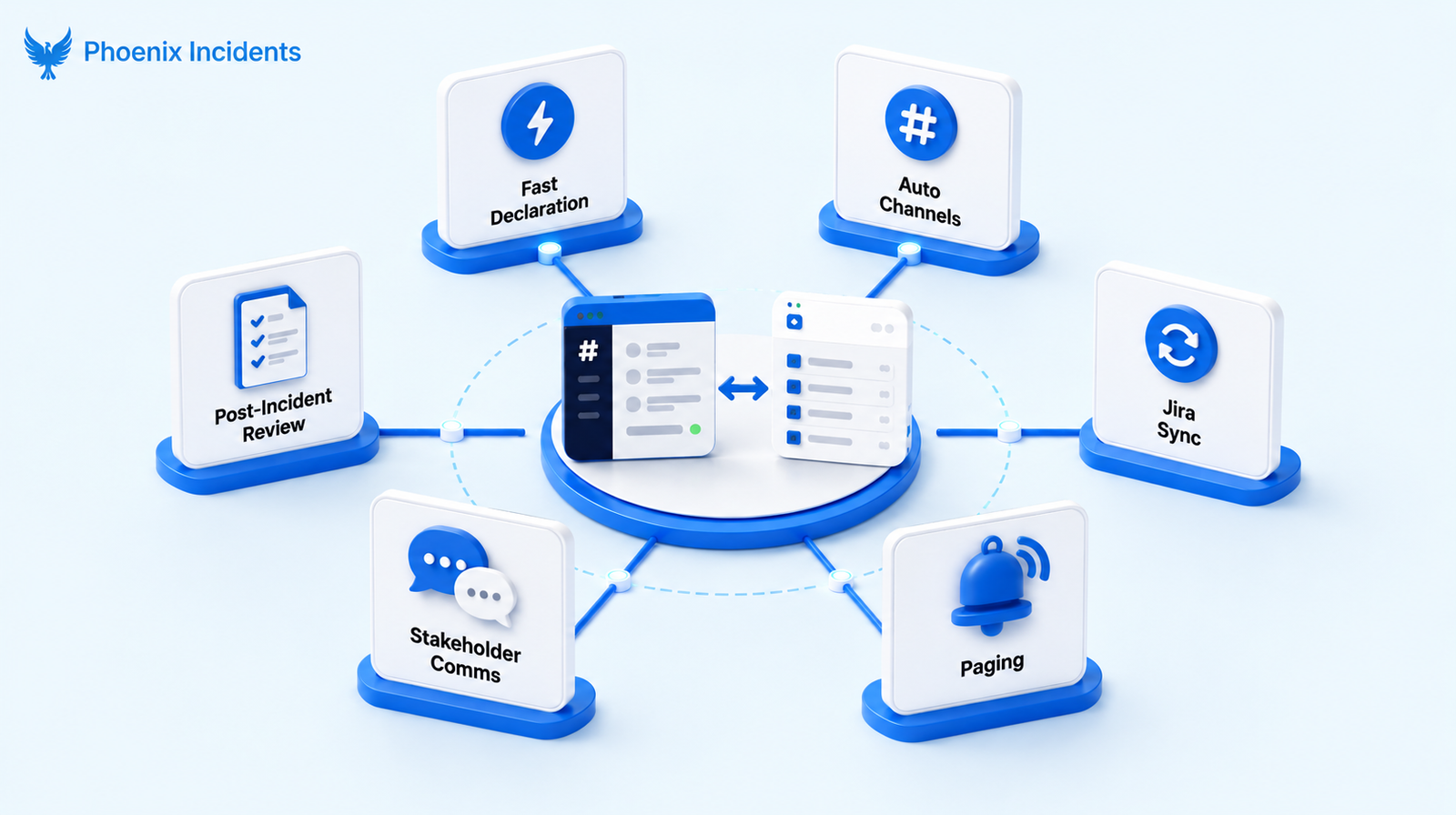
The fix is not to abandon Slack. It’s to wrap enough structure around it that the speed survives and the record does too. Each of the failure modes above maps to a specific capability, and a tool worth adopting should handle all of them rather than a convenient few.
1. Fast, Consistent Incident Declaration
Every incident should start the same way, which means declaring one needs to be faster than typing a paragraph of explanation into a channel. A slash command that opens a structured intake form does the work here, capturing severity, the affected service, and an owner at the moment of creation. The structure matters as much as the speed. When every incident begins with the same fields filled in, you get consistency that pays off later in reporting, and nobody spends the first ten minutes of a SEV-1 debating what counts as a SEV-1.
2. Automatic Incident Channels With Consistent Naming
The moment an incident is declared, a dedicated channel should appear on its own, seeded with the key details and named by a convention you set in advance. Consistent naming is the part teams underrate:
- Findable later: A channel called
#inc-2025-1218-payments-latencycan be traced six months on when you are reconstructing a pattern, while one called#help-prod-thingis gone the moment it is archived. - Lower barrier to declaring: Auto-creation removes the small step that, repeated across every incident, quietly discourages people from declaring at all.
3. Two-way Sync With Jira as the System of Record
This is the capability that separates a real incident management setup from a well-organized chat channel. Slack is the surface where the response happens, and Jira holds the canonical record of what happened.
Updates need to flow both ways automatically, so a status change in Slack updates the Jira issue and progress logged in Jira reflects back into the channel, without anyone copying text between the two. The contrast with the prevailing "centralize everything in Slack" approach shows up the moment an incident ends and the channel is archived:
- Slack-only setup: The record goes with the channel, so the timeline and decisions become hard to find once the conversation is closed.
- Jira-anchored setup: The full timeline, the linked issues, and the resolution stay exactly where the rest of your engineering work already lives.
4. Paging Coordination Without Leaving Slack
Mid-incident, you often need someone who is not in the channel yet, and the worst time to go hunting through a separate web console for an on-call schedule is during an active SEV-1. Good Slack incident management lets you see who is on call, page a person, a team, or an escalation policy, and coordinate the next steps in the channel.
This works through your existing paging tools rather than replacing them, so integrations with PagerDuty and Splunk On-Call handle the actual paging while the coordination stays where the responders already are.
5. Structured Stakeholder Communication
The technical response team is not the only audience during an incident.
- Customer Success needs to know what to tell customers
- Support needs to field tickets with accurate information
- Comms may need to post something public
- And leadership wants a status that does not require reading the whole channel
The goal is to keep all of them informed without flooding the response channel with questions that pull responders out of the work. A clear separation between where the incident is worked on and where it is communicated is important.
6. Post-incident Review That Actually Happens
The review is where incidents turn into improvements, and it only works if it happens reliably and draws on a real record. When the channel history feeds directly into a guided PIR, the timeline is already assembled and the review starts from facts rather than from whoever remembers the most.
The output that matters is a set of time-bound action items with owners, plus reminders that keep them from evaporating once the urgency fades. A blameless review that produces three owned, dated action items beats a thorough one that produces a document nobody opens again.
The Gap Most Incident Tools Leave Open
Most incident platforms want to become your system of record. They treat Jira as one integration among a hundred, a place to optionally mirror a ticket, while the real record lives inside their platform. That works fine if you are willing to reorganize your engineering process around a new source of truth. But it works badly if Jira is already where your work lives and you have no intention of moving it.
That leaves a specific and very common team underserved: engineers running plain Jira Software and Slack who want incident coordination without taking on more than they need.
What they are looking for is narrow and consistent:
- Incident coordination in the tools they already run
- No standalone incident platform to adopt
- No step up to Jira Service Management or its ITSM model
- Jira Software staying as the system of record
For years, the answer for these teams has been to build the bridge themselves. The engineering blogs are full of write-ups describing homegrown Slack bots that declare incidents, open Jira tickets, page responders, and stitch the three tools together, built in-house precisely because no vendor connected Slack-based coordination to Jira-based record-keeping the way the team needed.
Vladimir Vassiliouk, SRE at Airbnb documented exactly this, building a custom bot to centralize incident response in Slack while creating and updating Jira tickets behind the scenes.
The fact that capable teams keep building the same thing is a clear signal of real demand and an equally clear gap in what the market offers off the shelf.
How Phoenix Incidents Handles Slack Incident Management
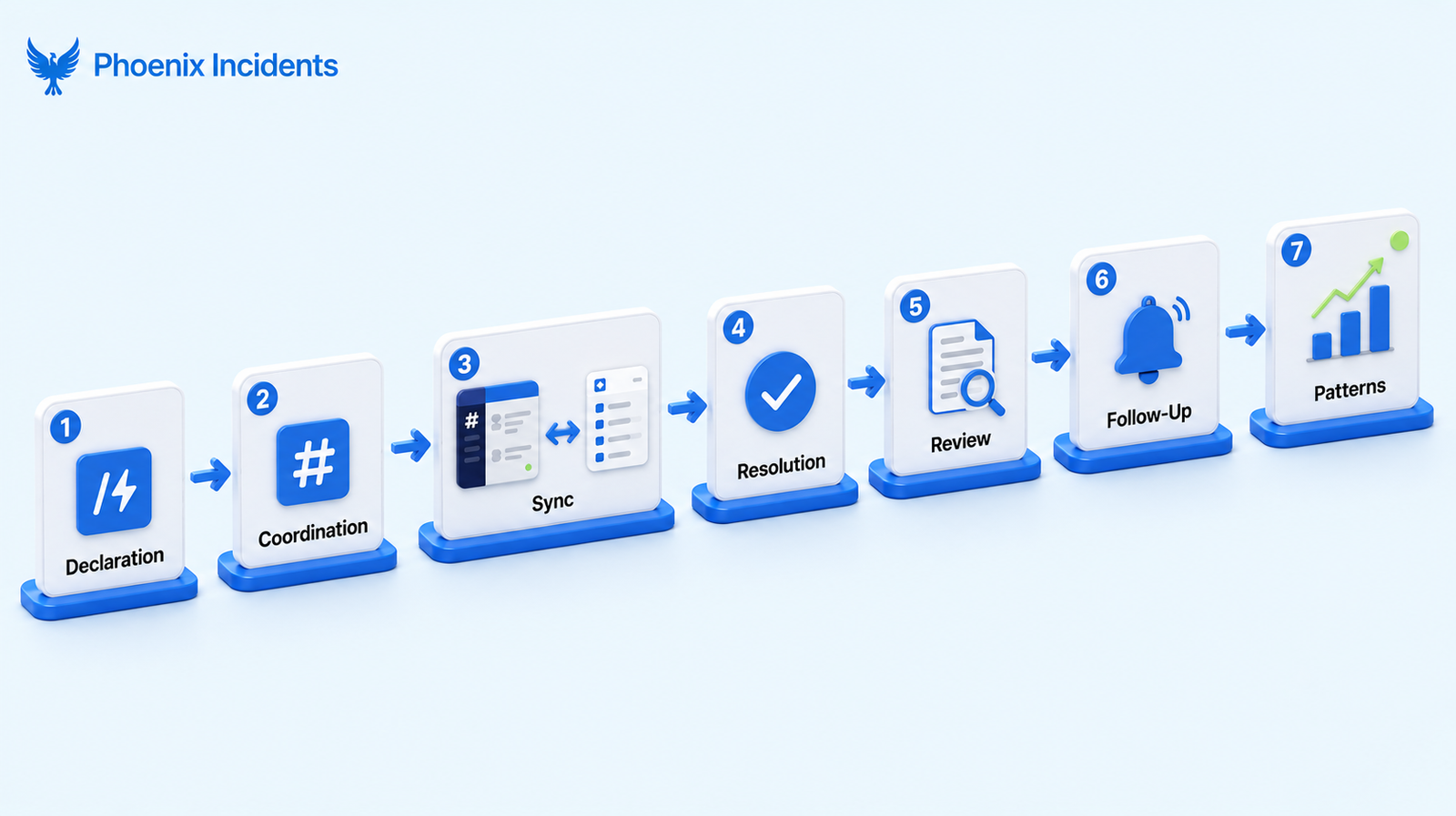
Phoenix Incidents is built for that gap. The approach is to orchestrate the tools you already run, Jira, Slack, and your paging platform, rather than replace any of them.
There’s no new system of record to adopt and no separate platform for your team to learn, because the incident lives in Slack while it is active and in Jira once it matters as a record.
The workflow runs in a clear sequence:
- Declaration: An engineer runs /phoenix in Slack to open a guided incident creation flow, capturing severity and the affected service from the start.
- Coordination: A dedicated Slack channel spins up automatically so the response has a focused home.
- Synchronization: Updates in Slack sync to the Jira issue, with reminders sent when action is needed to stay within your SLAs.
- Resolution: Status is tracked consistently in both Slack and Jira through the full response lifecycle.
- Structured PIR: A guided, LLM-assisted post-incident review turns the channel history into a real review with concrete findings.
- Follow-through: Slack reminders drive the resulting action items to completion.
- Pattern recognition: Reporting surfaces recurring themes so leaders can see what keeps breaking and why.
Phoenix Incidents vs. Manual Slack Workflows
The difference between coordinating in a bare Slack channel and running incidents through Phoenix Incidents shows up most clearly side by side.
| What you need | Slack alone | Phoenix Incidents |
|---|---|---|
| Jira sync | Manual and easily forgotten | Automatic and two-way |
| System of record | Lives in scrollback | Stays in Jira |
| Paging | Jump to another tool | Coordinated in Slack (PagerDuty, Splunk On-Call) |
| Process | Different every time | Consistent and enforced |
| Post-incident review | Inconsistent if it happens at all | Guided and structured |
| Action items | Scattered | Time-bound with Slack reminders |
| Reporting | Manual reconstruction | Built-in MTTA and SLA metrics |
When Phoenix Incidents is the Right Fit
Phoenix Incidents is a strong match for teams that recognize themselves in most of the following:
- Your responders already work in Slack and have no interest in moving the live response elsewhere.
- Jira is your system of record and you want it to stay that way.
- You run plain Jira Software and Slack, and you don’t want to adopt a separate incident platform or move up to Jira Service Management.
- Your engineers resist procedural overhead and will route around any process that slows them down.
- You want a consistent PIR process that produces owned and dated action items.
- You want reporting on incident metrics without adding yet another standalone tool.
The benefit is not limited to engineering, either.
Customer Support and Customer Success teams gain a clear, current view of what is happening during an incident, which means the people talking to customers are working from the same facts as the people fixing the problem.
How to Set Up Phoenix Incidents in Slack
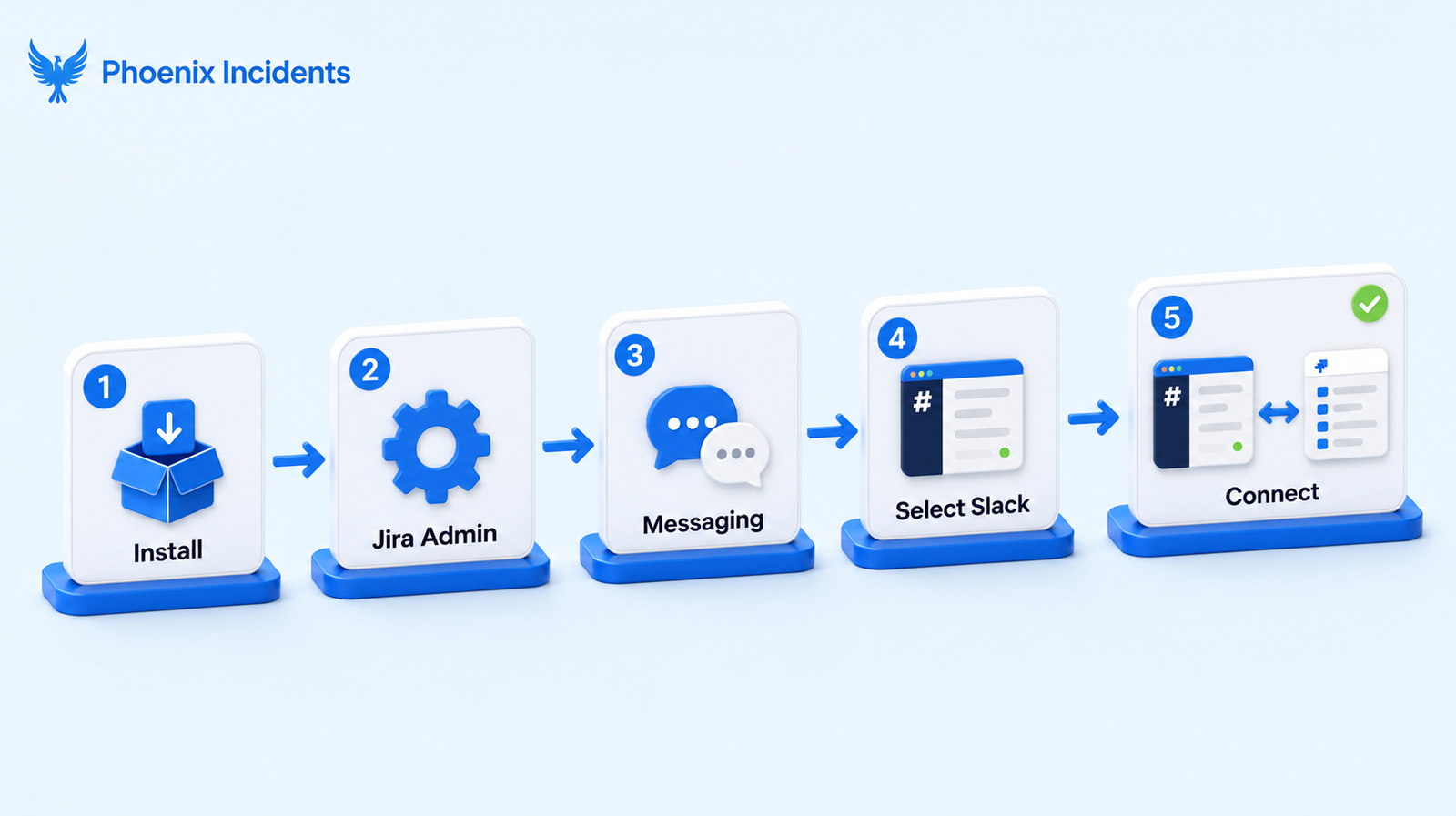
Connecting Phoenix Incidents to your Slack workspace takes a few minutes, and the setup lives entirely inside the Jira and Slack admin flows your team already knows.
Installation Steps
- Install Phoenix Incidents from the Atlassian Marketplace.
- Open the Apps section in your Jira Administration area, located under the settings icon.
- Go to Phoenix Incidents, then Messaging.
- Choose Slack from the available messaging providers.
- Click Connect Slack and approve the requested permissions when prompted.
Once the workspace is connected, Phoenix Incidents is ready to use in Slack.
Using Phoenix Incidents in Slack
After installation, the team can start running incidents straight away:
- Use /phoenix create to open a guided incident creation flow directly in Slack.
- Type /phoenix help to see the available commands and how to use them.
- Use the buttons and menus in Phoenix Incidents messages to update severity, status, and ownership without leaving the channel.
- Receive automated reminders to acknowledge incidents, verify resolutions, and post scheduled updates in line with your SLAs.
- Optionally configure Phoenix Incidents to create and manage dedicated incident channels automatically for focused response coordination.
Throughout, Jira stays the source of record while your team responds and coordinates where they already communicate.
Run Incidents in Slack the Efficient Way
If Slack is where your team coordinates during an outage, the answer is to add enough structure around it that the response stays fast, the record stays clean, and the lessons actually get captured.
Slack handles the live work, Jira holds the truth, and neither one asks your team to learn a new platform in the middle of an incident.
Phoenix Incidents brings that structure to the tools you already run, turning a busy channel into a coordinated response with a durable record and a PIR process that produces real follow-through.
Book a demo and see how your team can run incidents in Slack without losing Jira as the system of record.
Frequently asked questions
1. Can you manage incidents entirely in Slack?
You can run the entire live response in Slack, from declaration through coordination to resolution, and most teams should. What you should not do is let Slack be the only place the incident exists. The channel is ideal for the real-time work, but it gets archived and becomes hard to search, so the durable record belongs in Jira. Phoenix Incidents keeps the coordination in Slack and the record in Jira at the same time, so you get the speed without losing the history.
2. Does Phoenix Incidents replace PagerDuty or Splunk On-Call?
No. Phoenix Incidents coordinates around your existing paging tools rather than replacing them. It integrates with PagerDuty and Splunk On-Call so you can see who is on call and page the right person, team, or escalation policy from inside Slack, while the paging platform continues to do the paging.
3. Do you need Jira Service Management for this?
No. Phoenix Incidents works with plain Jira Software, which is the point. Teams that want structured incident management without adopting Jira Service Management or its ITSM model are exactly who it is built for.
4. How does Slack stay in sync with Jira?
Updates flow in both directions automatically. A status or severity change made in Slack updates the corresponding Jira issue, and progress logged in Jira reflects back into the Slack channel, so neither side drifts out of date and nobody has to copy information between them by hand.
5. What happens to the incident record after the channel is archived?
The full record stays in Jira. Because the incident is tied to a Jira issue throughout, archiving the Slack channel does not lose the timeline, the linked work, or the resolution. You keep everything where the rest of your engineering history already lives, which is what makes pattern recognition across past incidents possible.